
About Sorrel · · 6 min read · By Sorrel Buildcon
The Sorrel Heights Brochure Explained — Page by Page
Quick answer
The Sorrel Heights brochure runs to seven pages: the cover and tagline, a project highlights page listing the specifications, the typical floor plan showing five homes per floor, the duplex plans, two pages of unit plans with super areas, and a final page of terms and conditions with the location map and address. The terms page is the one worth reading twice.
Why read a brochure closely at all?
Most buyers flip through a brochure for the pictures and then ask the price. That is backwards. A brochure is the only document a builder publishes before you sign anything, and it contains three kinds of information: what is being built, what is being promised in the specification, and what the commercial terms are. Read in that order, it tells you most of what you need to ask at a site visit.
The Sorrel Heights brochure is short — seven pages — which is an advantage. Nothing hides in a hundred pages of lifestyle photography. Below, we walk through it page by page and flag the questions each page should prompt.
Pages 1 and 2 — cover and project highlights
Page one carries the project name and the tagline "A Higher Quality of Living", plus the developer's identity: Sorrel Buildcon Private Limited. Page two is the page that actually matters early — project highlights, which is the specification list. It covers flooring, security, doors, ceiling, toilets, kitchen, electrical, lift, recreation room, plumbing, parking, exterior, railing, painting and dado.
Read it as a checklist you will verify later on site: premium tile flooring, a smart lock on the front door, a 24×7 smart motion detection camera, designer false ceiling in all rooms, sensor lights in toilets with Cera or equivalent fittings, a modular kitchen with granite or marble counter, a lift to all floors and a recreation room for yoga, exercise, carrom and chess. The full list also appears on the Sorrel Heights specifications page, and the brands behind it are covered in the material brands explained.
Page 3 — the typical floor plan
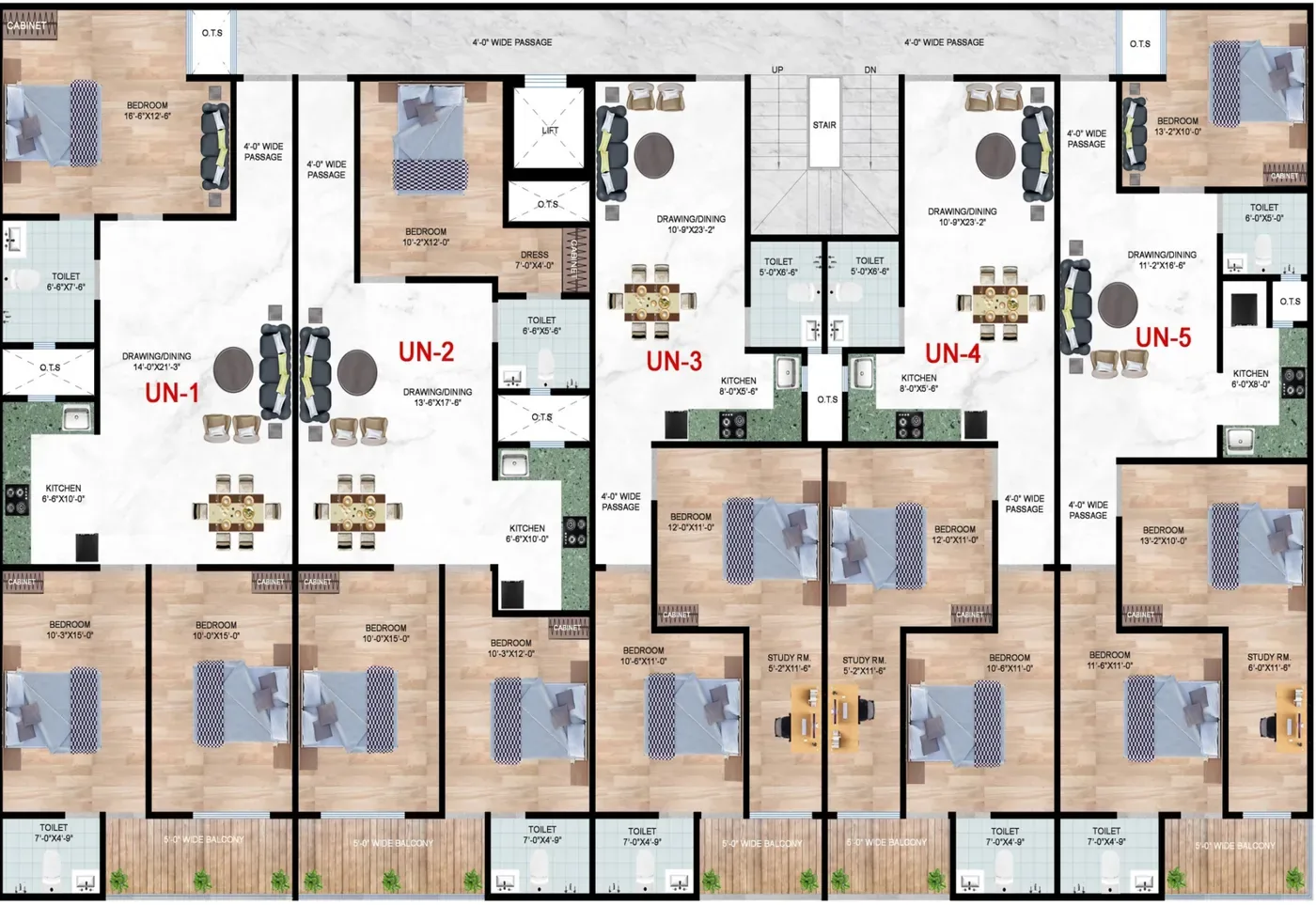
This single drawing tells you more about daily life than any render. It shows five homes on a typical floor, labelled UN-1 to UN-5, arranged around the lift and staircase core. From it you can read how many neighbours share your landing, where your entrance door faces, which walls are shared with which room next door, and which side each home's balconies open to.
Things to trace with your finger: does your bedroom share a wall with a neighbour's living room? Does the kitchen have an external wall for exhaust? Is the entrance door directly opposite another front door? Our typical floor guide walks through exactly these questions, and how to read a floor plan explains the symbols.
Page 4 — the duplex plans
The duplex homes sit at the top of the building with an open terrace and three toilets each. The brochure gives their super areas clearly:
| UN-1 duplex | 4BHK + study, 2650 sq.ft |
|---|---|
| UN-2 and UN-5 duplex | 4BHK + study, 2550 sq.ft |
| UN-3 and UN-4 duplex | 3BHK + study, 1920 sq.ft |
| Toilets | Three in each duplex |
| Terrace | Open terrace with each duplex |
When you study these pages, look at the internal staircase — its width, where it lands and how much of the lower floor it consumes. See duplex homes with terrace for the layouts and duplex staircase design and safety for what to check.
Pages 5 and 6 — the unit plans
Four layouts are drawn with their super areas: 3BHK Type A at 1750 sq.ft with a wide balcony, 3BHK + Dressing Type B at 1700 sq.ft, 2BHK + Study at 1280 sq.ft, and 3BHK + Study Type C at 1700 sq.ft. Two of the 3BHK variants share the same area but spend it differently — one on a dressing area, one on a study — which is a genuinely useful choice rather than a marketing distinction.
Remember these are super areas, which include a share of common spaces. Ask for the carpet area and individual room dimensions before comparing with any other project; carpet area vs super area explains why two 1700 sq.ft homes can feel very different. The layouts are on Sorrel Heights floor plans, with detail on the 2BHK + Study flats in Jalpura and 3BHK flats in Jalpura pages.
Page 7 — the terms page most people skip
Read this page twice. It sets out how the price is built up and what is payable when. At Sorrel Heights the total cost is BSP plus PLC plus meter charges; GST is 1% extra; and stamp duty and registration are payable at the offer of possession, not at booking. The page also sets out the conditions applying to delayed payments — read the exact rate and terms on your own copy rather than relying on a summary.
Three questions to take to the sales team from this page: which unit-specific PLC applies to the home you like, what the meter charges actually cover, and which special BSP plan you qualify for based on your payment timing. Background reading: BSP, PLC and super area explained and special BSP payment plans. For current figures, ask for the price list & payment plan sheet — prices are approximate, shared by Sorrel Buildcon and revised from time to time.
What a brochure cannot tell you
Be clear about the limits of any brochure, including this one. It is a marketing document, not a legal one. The agreement for sale is what binds both sides, and where the two differ, the agreement governs. A brochure also will not show you finishing quality, water pressure, lift behaviour or how the building handles a monsoon — only a visit and a look at a delivered project will.
So use the brochure to prepare, then verify. Check project registration on the state portal via UP RERA portal, read the agreement clauses to read, and confirm what is written about specifications in your own booking papers rather than in the printed highlights.
Get the brochure, the plans and the price sheet
Ask the team for the current brochure, the layout you are interested in and the live price sheet in one go, so you are comparing one consistent set of documents. Start with Sorrel Heights floor plans for the layouts, then price list & payment plan for the commercial side, and book a visit through contact the Sorrel team to check the specification page against the real building.
How to use the brochure
Use it as a checklist at three moments: when comparing projects (sizes and specifications), when signing documents (make sure the agreement matches) and at handover (check every item). Keep a printed copy with your property papers.
What the brochure does not include
Prices, possession dates and the RERA registration number are not in the brochure. Ask the sales team for these in writing — see price list & payment plan and how to verify RERA.
Images are indicative
The elevation and interior images are artist's impressions. Specifications and plans can change at the developer's discretion, so the signed agreement is what counts.
Facts about Sorrel Heights on this page come from the official brochure and Sorrel Buildcon. General guidance is for information only — confirm rules and rates with the relevant authority before you act.